About GlobalProtect Legacy
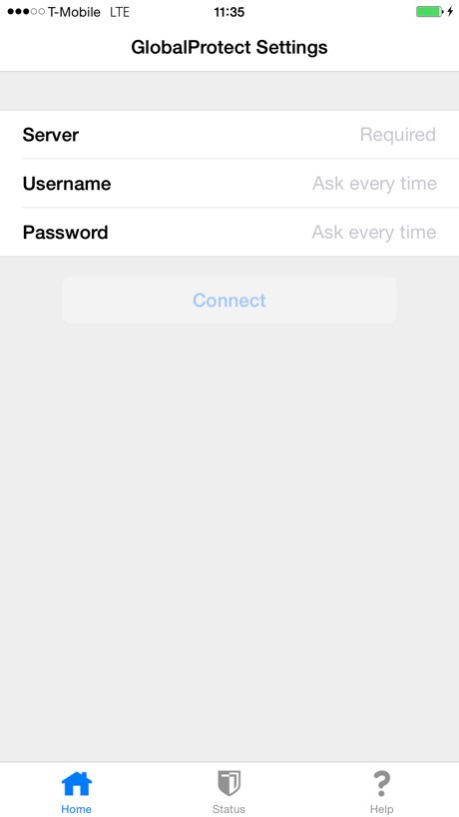
GlobalProtect for iOS connects to a GlobalProtect gateway on a Palo Alto Networks next-generation firewall allowing mobile users to benefit from the protection of enterprise security. The app automatically adapts to the...
GlobalProtect for iOS connects to a GlobalProtect gateway on a Palo Alto Networks next-generation firewall allowing mobile users to benefit from the protection of enterprise security. The app automatically adapts to the end-user’s location and connects the user to the optimal gateway in order to deliver the best performance for all users and their traffic, without requiring any effort from the user. This allows users to work safely and effectively at locations outside of the traditional office. Before installing this app, please check with your IT department to ensure that your organization has enabled a GlobalProtect gateway subscription on the firewall. Features: - Automatic VPN connection via full support for iOS VPN On-Demand - Automatic discovery of optimal gateway - Manual gateway selection capability - Connect via IPSec or SSL - Supports configuration deployed via an MDM - Supports all of the existing PAN-OS authentication methods including Kerberos, RADIUS, LDAP, client certificates, and a local user database - Provides the full benefit of the native experience and allows users to securely use any app Requirements: - Network administrators; please contact your Palo Alto Networks sales representative or channel partner to add GlobalProtect gateway subscription to your firewalls in order to enable support for GlobalProtect for iOS. - Supported on Palo Alto Networks next-generation firewalls running PAN-OS 4.0, 4.1 and 5.0.
Version History GlobalProtect app 4.1.5 for iOS is now renamed GlobalProtect Legacy and is superseded by the newly redesigned GlobalProtect app 5.0. We recommend that you uninstall any older versions and download GlobalProtect app 5.0 from the App Store. 4.1.5 09/14/2018 Bug Fixes 4.1.1 06/04/2018 Bug Fixes 4.1.0 03/14/2018 Bug Fix 4.0.6 01/26/2018 Bug Fixes 4.0.5 12/22/2017 SAML & 2FA Bug Fix 4.0.4 10/16/2017 Bug Fixes Resilient VPN Connection Improved Automatic Gateway Selection 4.0.3 09/21/2017 Bug Fixes 4.0.2 05/26/2017 Bug Fix 4.0.1 02/08/2017 IPv6 for GlobalProtect Split Tunnel by Excluding Access Routes External Gateway Priority by Source Region Internal GatewaySelection by Source IP Address 4.0 02/01/2017 Improved user experience for two-factor authentication using OTPs, challenge-response tokens, and certificates 3.0.2 05/26/2016 Improved user experience for two-factor authentication using OTPs, challenge-response tokens, and certificates 3.0.1 04/27/2016 Improved user experience for two-factor authentication using OTPs, challenge-response tokens, and certificates 3.0.0 02/23/2016 Bug Fixes 2.3.3 12/08/2015 Supports iOS 9 2.3.2 09/24/2015 Bug Fixes 2.3.0 07/09/2015 Per-App VPN bug fixes 2.1.1 12/08/2014 - Supports iOS 8 - Supports Per-App VPN Enhanced to integrate with GlobalProtect Mobile Security Manager to further extend the protection of enterprise security to mobile users. - Enables device administration - Provides an enterprise app store for users to browse and install business apps Note: - Network administrators; please contact your Palo Alto Networks sales representative or channel partner to purchase GlobalProtect Mobile Security Manager. 2.1.0 09/23/2014 Bug Fixes 2.0.2 04/12/2014 Bug Fixes 2.0.1 03/18/2014 Enhanced to integrate with GlobalProtect Mobile Security Manager to further extend the protection of enterprise security to mobile users. Benefits include: - Superlative user experience, nonintrusive and transparent next-generation security - Enables device management - Security policy based on device state information Note: - Network administrators; please contact your Palo Alto Networks sales representative or channel partner to purchase GlobalProtect Mobile Security Manager for device management and device state features 2.0.0 01/29/2014 Support for 5S, 64 bit iOS VPN On Demand bug fix when VPN configuration was pushed from an MDM Server 1.3.5 11/14/2013 VPN On Demand support for iOS 7 Minor Bug fixes and Enhancements Support for 64 bit iPhone 5S coming soon … (The App is functional on 64 bit iPhone 5S but may stop responding under certain conditions) 1.3.4 10/11/2013 VPN On Demand support for iOS 7 Minor Bug fixes and Enhancements Support for 64 bit iPhone 5S coming soon … (The App is functional on 64 bit iPhone 5S but may stop responding under certain conditions) 1.3.3 09/30/2013 Performance improvements and bug fixes 1.3.1 05/01/2013
Previous Versions
Here you can find the changelog of GlobalProtect Legacy since it was posted on our website on 2016-09-30 15:01:20.
The latest version is 4.1.5 and it was updated on 2026-10-14 12:42:57. See below the changes in each version.
GlobalProtect Legacy version 4.1.5
Updated At: 2026-10-14
Changes: Version History GlobalProtect app 4.1.5 for iOS is now renamed GlobalProtect Legacy and is superseded by the newly redesigned GlobalProtect app 5.0. We recommend that you uninstall any older versions and download GlobalProtect app 5.0 from the App Store. 4.1.5 09/14/2018 Bug Fixes 4.1.1 06/04/2018 Bug Fixes 4.1.0 03/14/2018 Bug Fix 4.0.6 01/26/2018 Bug Fixes 4.0.5 12/22/2017 SAML & 2FA Bug Fix 4.0.4 10/16/2017 Bug Fixes
Resilient VPN Connection
Improved Automatic Gateway Selection 4.0.3 09/21/2017 Bug Fixes 4.0.2 05/26/2017 Bug Fix 4.0.1 02/08/2017 IPv6 for GlobalProtect
Split Tunnel by Excluding Access Routes
External Gateway Priority by Source Region
Internal GatewaySelection by Source IP Address 4.0 02/01/2017 Improved user experience for two-factor authentication using OTPs, challenge-response tokens, and certificates 3.0.2 05/26/2016 Improved user experience for two-factor authentication using OTPs, challenge-response tokens, and certificates 3.0.1 04/27/2016 Improved user experience for two-factor authentication using OTPs, challenge-response tokens, and certificates 3.0.0 02/23/2016 Bug Fixes 2.3.3 12/08/2015 Supports iOS 9 2.3.2 09/24/2015 Bug Fixes 2.3.0 07/09/2015 Per-App VPN bug fixes 2.1.1 12/08/2014 - Supports iOS 8
- Supports Per-App VPN
Enhanced to integrate with GlobalProtect Mobile Security Manager to further extend the protection of enterprise security to mobile users.
- Enables device administration
- Provides an enterprise app store for users to browse and install business apps
Note:
- Network administrators; please contact your Palo Alto Networks sales representative or channel partner to purchase GlobalProtect Mobile Security Manager. 2.1.0 09/23/2014 Bug Fixes 2.0.2 04/12/2014 Bug Fixes 2.0.1 03/18/2014 Enhanced to integrate with GlobalProtect Mobile Security Manager to further extend the protection of enterprise security to mobile users.
Benefits include:
- Superlative user experience, nonintrusive and transparent next-generation security
- Enables device management
- Security policy based on device state information
Note:
- Network administrators; please contact your Palo Alto Networks sales representative or channel partner to purchase GlobalProtect Mobile Security Manager for device management and device state features 2.0.0 01/29/2014 Support for 5S, 64 bit iOS
VPN On Demand bug fix when VPN configuration was pushed from an MDM Server 1.3.5 11/14/2013 VPN On Demand support for iOS 7
Minor Bug fixes and Enhancements
Support for 64 bit iPhone 5S coming soon … (The App is functional on 64 bit iPhone 5S but may stop responding under certain conditions) 1.3.4 10/11/2013 VPN On Demand support for iOS 7
Minor Bug fixes and Enhancements
Support for 64 bit iPhone 5S coming soon … (The App is functional on 64 bit iPhone 5S but may stop responding under certain conditions) 1.3.3 09/30/2013 Performance improvements and bug fixes 1.3.1 05/01/2013
GlobalProtect Legacy version 4.1.5
Updated At: 2026-09-05
Changes: Version History This app has been updated by Apple to prepare for watchOS 27 compatibility. No new features are included.
GlobalProtect app 4.1.5 for iOS is now renamed GlobalProtect Legacy and is superseded by the newly redesigned GlobalProtect app 5.0. We recommend that you uninstall any older versions and download GlobalProtect app 5.0 from the App Store. 4.1.5 09/14/2018 Bug Fixes 4.1.1 06/04/2018 Bug Fixes 4.1.0 03/14/2018 Bug Fix 4.0.6 01/26/2018 Bug Fixes 4.0.5 12/22/2017 SAML & 2FA Bug Fix 4.0.4 10/16/2017 Bug Fixes
Resilient VPN Connection
Improved Automatic Gateway Selection 4.0.3 09/21/2017 Bug Fixes 4.0.2 05/26/2017 Bug Fix 4.0.1 02/08/2017 IPv6 for GlobalProtect
Split Tunnel by Excluding Access Routes
External Gateway Priority by Source Region
Internal GatewaySelection by Source IP Address 4.0 02/01/2017 Improved user experience for two-factor authentication using OTPs, challenge-response tokens, and certificates 3.0.2 05/26/2016 Improved user experience for two-factor authentication using OTPs, challenge-response tokens, and certificates 3.0.1 04/27/2016 Improved user experience for two-factor authentication using OTPs, challenge-response tokens, and certificates 3.0.0 02/23/2016 Bug Fixes 2.3.3 12/08/2015 Supports iOS 9 2.3.2 09/24/2015 Bug Fixes 2.3.0 07/09/2015 Per-App VPN bug fixes 2.1.1 12/08/2014 - Supports iOS 8
- Supports Per-App VPN
Enhanced to integrate with GlobalProtect Mobile Security Manager to further extend the protection of enterprise security to mobile users.
- Enables device administration
- Provides an enterprise app store for users to browse and install business apps
Note:
- Network administrators; please contact your Palo Alto Networks sales representative or channel partner to purchase GlobalProtect Mobile Security Manager. 2.1.0 09/23/2014 Bug Fixes 2.0.2 04/12/2014 Bug Fixes 2.0.1 03/18/2014 Enhanced to integrate with GlobalProtect Mobile Security Manager to further extend the protection of enterprise security to mobile users.
Benefits include:
- Superlative user experience, nonintrusive and transparent next-generation security
- Enables device management
- Security policy based on device state information
Note:
- Network administrators; please contact your Palo Alto Networks sales representative or channel partner to purchase GlobalProtect Mobile Security Manager for device management and device state features 2.0.0 01/29/2014 Support for 5S, 64 bit iOS
VPN On Demand bug fix when VPN configuration was pushed from an MDM Server 1.3.5 11/14/2013 VPN On Demand support for iOS 7
Minor Bug fixes and Enhancements
Support for 64 bit iPhone 5S coming soon … (The App is functional on 64 bit iPhone 5S but may stop responding under certain conditions) 1.3.4 10/11/2013 VPN On Demand support for iOS 7
Minor Bug fixes and Enhancements
Support for 64 bit iPhone 5S coming soon … (The App is functional on 64 bit iPhone 5S but may stop responding under certain conditions) 1.3.3 09/30/2013 Performance improvements and bug fixes 1.3.1 05/01/2013
GlobalProtect Legacy version 4.1.5
Updated At: 2026-08-24
Changes: Version History This update from Apple will improve the functionality of this app. No new features are included.
GlobalProtect app 4.1.5 for iOS is now renamed GlobalProtect Legacy and is superseded by the newly redesigned GlobalProtect app 5.0. We recommend that you uninstall any older versions and download GlobalProtect app 5.0 from the App Store. 4.1.5 09/14/2018 Bug Fixes 4.1.1 06/04/2018 Bug Fixes 4.1.0 03/14/2018 Bug Fix 4.0.6 01/26/2018 Bug Fixes 4.0.5 12/22/2017 SAML & 2FA Bug Fix 4.0.4 10/16/2017 Bug Fixes
Resilient VPN Connection
Improved Automatic Gateway Selection 4.0.3 09/21/2017 Bug Fixes 4.0.2 05/26/2017 Bug Fix 4.0.1 02/08/2017 IPv6 for GlobalProtect
Split Tunnel by Excluding Access Routes
External Gateway Priority by Source Region
Internal GatewaySelection by Source IP Address 4.0 02/01/2017 Improved user experience for two-factor authentication using OTPs, challenge-response tokens, and certificates 3.0.2 05/26/2016 Improved user experience for two-factor authentication using OTPs, challenge-response tokens, and certificates 3.0.1 04/27/2016 Improved user experience for two-factor authentication using OTPs, challenge-response tokens, and certificates 3.0.0 02/23/2016 Bug Fixes 2.3.3 12/08/2015 Supports iOS 9 2.3.2 09/24/2015 Bug Fixes 2.3.0 07/09/2015 Per-App VPN bug fixes 2.1.1 12/08/2014 - Supports iOS 8
- Supports Per-App VPN
Enhanced to integrate with GlobalProtect Mobile Security Manager to further extend the protection of enterprise security to mobile users.
- Enables device administration
- Provides an enterprise app store for users to browse and install business apps
Note:
- Network administrators; please contact your Palo Alto Networks sales representative or channel partner to purchase GlobalProtect Mobile Security Manager. 2.1.0 09/23/2014 Bug Fixes 2.0.2 04/12/2014 Bug Fixes 2.0.1 03/18/2014 Enhanced to integrate with GlobalProtect Mobile Security Manager to further extend the protection of enterprise security to mobile users.
Benefits include:
- Superlative user experience, nonintrusive and transparent next-generation security
- Enables device management
- Security policy based on device state information
Note:
- Network administrators; please contact your Palo Alto Networks sales representative or channel partner to purchase GlobalProtect Mobile Security Manager for device management and device state features 2.0.0 01/29/2014 Support for 5S, 64 bit iOS
VPN On Demand bug fix when VPN configuration was pushed from an MDM Server 1.3.5 11/14/2013 VPN On Demand support for iOS 7
Minor Bug fixes and Enhancements
Support for 64 bit iPhone 5S coming soon … (The App is functional on 64 bit iPhone 5S but may stop responding under certain conditions) 1.3.4 10/11/2013 VPN On Demand support for iOS 7
Minor Bug fixes and Enhancements
Support for 64 bit iPhone 5S coming soon … (The App is functional on 64 bit iPhone 5S but may stop responding under certain conditions) 1.3.3 09/30/2013 Performance improvements and bug fixes 1.3.1 05/01/2013
GlobalProtect Legacy version 4.1.5
Updated At: 2018-09-14
Changes: This app has been updated by Apple to display the Apple Watch app icon.
GlobalProtect app 4.1.5 for iOS is now renamed GlobalProtect Legacy and is superseded by the newly redesigned GlobalProtect app 5.0. We recommend that you uninstall any older versions and download GlobalProtect app 5.0 from the App Store.
GlobalProtect Legacy version 4.1.5
Updated At: 2018-09-14
Changes: Sep 14, 2018 Version 4.1.5
This app has been updated by Apple to display the Apple Watch app icon.
GlobalProtect app 4.1.5 for iOS is now renamed GlobalProtect Legacy and is superseded by the newly redesigned GlobalProtect app 5.0. We recommend that you uninstall any older versions and download GlobalProtect app 5.0 from the App Store.
GlobalProtect Legacy version 4.1.5
Updated At: 2018-09-14
Changes: Sep 14, 2018 Version 4.1.5
This app has been updated by Apple to use the latest Apple signing certificate.
GlobalProtect app 4.1.5 for iOS is now renamed GlobalProtect Legacy and is superseded by the newly redesigned GlobalProtect app 5.0. We recommend that you uninstall any older versions and download GlobalProtect app 5.0 from the App Store.
GlobalProtect Legacy version 4.1.5
Updated At: 2018-09-14
Changes: Sep 14, 2018 Version 4.1.5
GlobalProtect app 4.1.5 for iOS is now renamed GlobalProtect Legacy and is superseded by the newly redesigned GlobalProtect app 5.0. We recommend that you uninstall any older versions and download GlobalProtect app 5.0 from the App Store.
GlobalProtect Legacy version 4.1.5
Updated At: 2018-09-14
Changes: 14 sept. 2018 Version 4.1.5
GlobalProtect app 4.1.5 for iOS is now renamed GlobalProtect Legacy and is superseded by the newly redesigned GlobalProtect app 5.0. We recommend that you uninstall any older versions and download GlobalProtect app 5.0 from the App Store.
GlobalProtect Legacy version 3.0.2
Updated At: 2013-03-14
GlobalProtect Legacy version 4.1.5
Updated At: 1970-01-01
Changes: 14 de sep. de 2018 Version 4.1.5
GlobalProtect app 4.1.5 for iOS is now renamed GlobalProtect Legacy and is superseded by the newly redesigned GlobalProtect app 5.0. We recommend that you uninstall any older versions and download GlobalProtect app 5.0 from the App Store.
Disclaimer
Official App Store Link
We do not host GlobalProtect Legacy on our servers. We did not scan it for viruses, adware, spyware or other type of malware. This app is hosted by Apple and passed their terms and conditions to be listed there. We recommend caution when installing it.
The App Store link for GlobalProtect Legacy is provided to you by apps112.com without any warranties, representations or guarantees of any kind, so access it at your own risk.
If you have questions regarding this particular app contact the publisher directly. For questions about the functionalities of apps112.com contact us.